The gap between a product idea and a delivered product has always been the cost of translation: idea to requirements, requirements to design, design to code, code to tests, tests to production. In classic DevOps, people did that translation by hand at every step, and automation only touched CI/CD. AI changes the economics. But an AI assistant on its own just makes each step faster. It doesn't give you a process.
That is the problem I've been working on: how do you take "an idea is all you need" from a slogan to something a whole team can run repeatedly, with the same quality bar every time? My answer is a process layer that sits on top of the AI tools you already use. This post walks through how it works.
Ad-hoc prompting does not scale
Most teams start the same way. Each developer opens a chat tool and prompts it in their own style. It works well enough for one person on one task. Across a team, a few things go wrong:
- No enforced sequence. Everyone decides what to ask, when, and in what order.
- No memory. Every session starts from zero. The AI doesn't know what you decided, or what broke, last sprint.
- Documentation drifts. Specs and architecture docs fall behind within a sprint because writing them is manual.
- No audit trail. Nothing records what was prompted, what came back, or why a decision was made.
- Uneven quality. Output depends on how each person happens to prompt.
The AI is not the missing piece. The process around it is.
What the AIOps framework is
The AIOps Framework is a productionized variant of gstack, the open-source toolkit released by Garry Tan, adapted for how our teams deliver software. It is not a plugin and not a point tool. It is a structured pipeline of skills, agents and templates that maps each phase of the software lifecycle to an AI-driven workflow, with explicit human gates between phases.
Two design decisions matter most:
- It is the process layer, not a replacement. It runs on top of Claude Code, GitHub Copilot, or both within one team.
- Everything is version-controlled markdown. Skills, agent definitions and templates live in your own git repositories, so you can fork any of them, review changes in a PR, and roll back.
The goal isn't to remove people. When AI can turn meeting notes into a structured requirements document, break it into a dependency-ordered task graph and implement tasks in parallel, the BA, architect, developer and PM are freed from ceremony and returned to judgment.
Who does what
The framework gives every role a clear job in the same pipeline, instead of each one prompting separately.
The pipeline director
Owns requirements. Writes user stories the AI can execute, and checks every generated requirements document against real domain knowledge.
The design gate
Validates the task graph, reviews the AI-drafted technical design, and approves architecture decisions before any code is written.
The delivery gate
Runs the development pipeline, reviews every pull request before merge, and is the final check on code quality and security.
The planning gate
Approves AI-generated sprint plans, adjusts for velocity and capacity, and reviews release notes before anyone outside the team sees them.
Mapping the SDLC to the pipeline
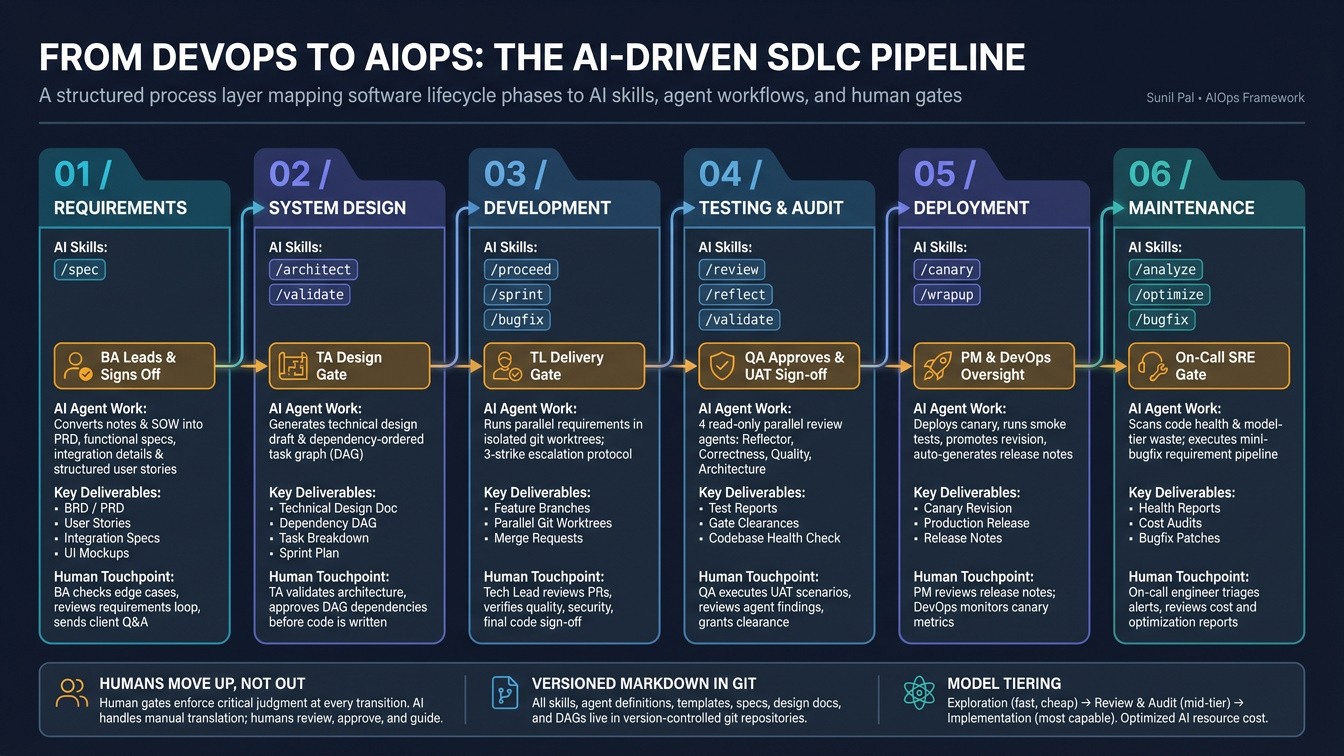
The framework starts after planning. Assume the SOW is signed and scope, feasibility and timeline documents exist. Those become inputs. From there, each phase has a set of skills (slash commands), a defined human touch point, and concrete deliverables.
| SDLC phase | Framework skills | Human touch point | Deliverables |
|---|---|---|---|
| Requirements | /spec |
AI-assisted, BA leads | BRD/PRD, user stories, integration specs |
| System design | /architect, /validate |
AI-generated, human-reviewed | Technical design doc, task breakdown, sprint plan |
| Development | /proceed, /sprint, /bugfix |
AI-driven, TL reviews | Merge requests, feature branches |
| Testing | /review, /reflect, /validate |
AI-automated, QA approves | Test reports, gate clearances, UAT sign-off |
| Deployment | /canary, /wrapup |
AI-executed, DevOps oversight | Canary revision, production deploy, release notes |
| Maintenance | /analyze, /optimize, /bugfix |
AI-monitored, on-call human | Health reports, cost audits, patches |
Phase by phase
1. Requirements: the BA directs the AI
The BA defines the output structure first: functional and non-functional requirements, story format, tech constraints, integration surfaces and acceptance criteria. Then /spec drafts the requirements document from elicitation notes and commits it to the repo.
The review loop is where domain knowledge earns its keep. The BA checks for missing edge cases and misrepresented requirements, sends open questions to the client, feeds the answers back and has the AI re-review. The guide asks for at least two full cycles before sign-off.
One habit I like: user stories do double duty. They tell the business what is wanted, and they give the AI enough precision to generate the right code, down to the endpoint and filter parameters. And instead of static wireframes, the BA can ask the AI to build the UI on a throwaway branch from the stories and screenshot the result into the requirements document.
2. System design: a task graph, not a to-do list
/architect turns a signed-off requirement into two artifacts: a first-draft technical design and a dependency-ordered task graph (a DAG). The tech lead reviews the graph before it becomes the sprint basis. Dependencies between features, integrations and data transformations have to be declared explicitly, because an undeclared dependency is a blocked sprint.
3. Development: parallel work in isolated worktrees
/proceed runs the full nine-phase pipeline for one requirement. /sprint runs several requirements at once, each in its own isolated git worktree, so developers never block each other. A /status command shows everything in flight.
Gates have a failure protocol:
- First failure: the orchestrating agent fixes it automatically.
- Second failure: it tries a different approach.
- Third failure: the pipeline pauses and escalates to a human with full context.
Three consecutive failures usually mean a problem the AI can't resolve alone, so that is a mandatory human checkpoint rather than a fourth blind retry.
4. Testing: reviewers that can't write code
Review runs as four read-only agents in parallel: a reflector that checks against past lessons, plus correctness, quality and architecture reviewers. "Read-only" is the important part. They report findings and never edit code, and the orchestrating skill decides what to fix. That removes agent drift and leaves a clean decision trail. QA still executes UAT scenarios and signs off.
5. Deployment: canary first, docs for free
/canary deploys a zero-traffic revision, runs smoke tests, then promotes it or rolls back automatically. /wrapup closes the feature: it merges, updates the architecture docs, writes a lessons-learned file and generates release notes. The PM reviews those notes before anything goes to customers.
6. Maintenance: bugs go through the same gates
/analyze runs a codebase health audit (tech debt, convention drift, coverage, stale docs). /optimize scans for model-tier waste, slow queries and payload bloat. /bugfix treats a bug as a mini requirement, so every fix gets the same gate pipeline and audit trail as a feature.
Three ideas that make it work
Documentation as a by-product
Nobody writes docs separately. /spec commits the requirement. /architect commits the design and task graph. /wrapup commits lessons learned and release notes. Everything lives in git next to the code, so it can't fall out of sync without showing up in a diff.
Knowledge that compounds
After every feature, a lessons-learned file is written, indexed by domain, component and requirement. The architect step queries that knowledge base before each new design run, and the reflector uses it to catch repeat mistakes. Sprint over sprint, the pipeline gets better at your codebase instead of starting fresh each time.
Model tiering
Each of the 16 agents is a markdown file declaring its model tier and allowed tools. Cheap, fast models handle exploration, a mid-tier model handles read-only review, and the most capable model writes production code. The guide estimates roughly a 60% cost reduction on exploration tasks compared with running the top model for everything. Treat that as the framework's own estimate and measure it on your workload.
| Tier | Used for | Can write code? |
|---|---|---|
| Exploration (fast, cheapest) | Pattern matching across the codebase during design | No |
| Review and audit (mid) | Correctness, quality and architecture review, reflection | No |
| Implementation (most capable) | Writing production code, running the pipeline | Yes |
Three layers of customization
The framework has three independent layers, so you can change one without touching the others:
- Framework core: every skill, agent and template is a versioned markdown file. Fork, modify, commit.
- Team configuration: shared conventions, coding standards and review checklists.
- Per-project config: a config file committed to each repo. Nothing project-specific is hardcoded in the framework.
New developers clone the repo, link the framework and run /init. Every convention, checklist and gate is active from the first commit.
Claude Code or GitHub Copilot?
Both can drive the framework. The difference is depth of native integration, not capability. With Claude Code, the pipeline, parallel worktrees, declarative agents and knowledge base are native. With Copilot, you replicate the same process through an instructions file and GitHub Actions gates per phase, and parallelism is more limited. Many teams use both: Claude Code for heavy pipeline work like parallel sprints, architecture and deep review, and Copilot for inline suggestions in the IDE. The artifacts are plain files in the repo, so they work the same regardless of which tool produced them.
Getting started
Clone the framework
Clone the AIOps Framework repository once and link it so a single git pull updates every developer.
Initialize your project
Run /init in the repo, set your stack and deploy targets in the project config, and commit it.
Run one requirement end to end
Write a spec, run the architect step, then /proceed. Review the PR as you normally would.
Scale to a sprint
Once one requirement flows cleanly, use /sprint to run several in parallel.
Ad-hoc prompting has near-zero setup. This framework has a moderate one-time cost: cloning, linking and initializing each project. The payoff is consistency and less rework, and in my experience it shows up within the first sprint. For a one-person weekend project, it's probably overkill.
The takeaway
DevOps automated the pipeline between code and production. AIOps extends that idea to the whole lifecycle, from the first requirement to the last bug fix, and keeps people at the gates where judgment matters. The gates are the point: three-strike escalation, read-only reviewers, and human sign-off on requirements, design, merge and release.
If you tried AI assistants and found the results inconsistent, the fix may not be a better model. It may be a process layer that makes every run look the same. The framework is open source, so you can read the skills and agent definitions yourself, fork them, and adapt them to your team.